iBUYPOWER MK9 Pro RGB Mechanical Keyboard review
Aesthetics x Affordability


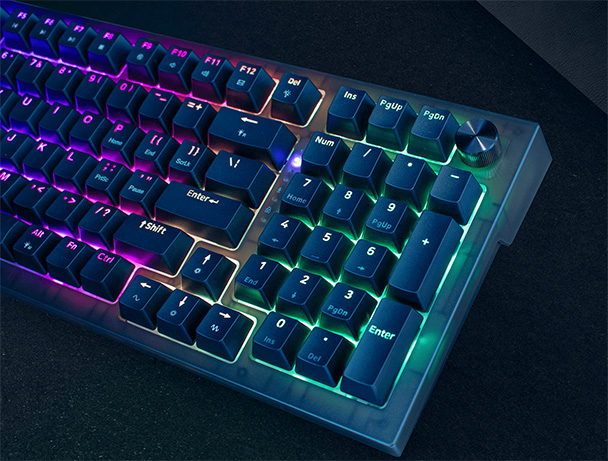
The iBUYPOWER MK9 Pro is a full-sized mechanical keyboard undoubtedly built with gamers in mind. From the moment you plug in the detachable USB-C cable, you’re greeted with brief, but eye-catching RGB lightshow. The other immediately prominent feature is a translucent body that permits the peripheral to emit a warm glow. Unlike some compact or low-profile models, the 98 key, 96% layout MK9 Pro makes no attempt at subtlety. At 883 grams, it’s a sturdy piece of gear designed to sit at the center of your desk setup, where performance and presentation matter more than sheer portability.
Like many of the streaming setups you see on social platforms, MK9 Pro exudes personality. If you want the device to coordinate with the rest of your rig, you can download HYTE Nexus and customize the lighting theme that synchronizes with on-screen color palettes or just remains locked to a specific hue. If you’d rather not download another app, there are twenty-six different function key commands that can cycle through backlighting presets, adjust the LED brightness, or just go stealth and turn off the lighting. So, if you’re looking for aesthetic appeal, the sixty-dollar MK9 Pro delivers. But a lingering question remains: does the keyboard functionality match the quality of its appearance?

What’s in the Box?(Hint: Not That Much)
Unboxing the MK9 Pro reveals the device housed in protective bubble wrap and accompanied by a concise manual. Beyond a keycap puller and a two-meter USB-C cable hidden under a folded box flap, it’s evident that iBUYPOWER favors a no-frills approach. As such, if you’re expecting extras like themed keycaps or alternative switch samples, keep your expectations restrained. The one upside is a quick reference sticker attached to the bottom.
Instead of providing embellishments, the manufacturer seems to be striving for a balance between affordability and build quality. Largely, the keyboard’s body is sturdy, resisting bending under aggressive typing and gamming sessions. But that’s not to say Mk9 Pro is built like a tank. The frame can be easily twisted. The good news is that flexing doesn’t seem to cause any permanent harm.

Everyday Use and Cleaning
Like many gaming-focused keyboards, dust and fingerprint buildup are inevitable, but routine cleaning with the included puller ensures the keyboard can remain camera-ready. But if you do live in an environment with a lot of dog fur, the while color way might be a better option. The plastic on the black MK9 Pro was a magnet for blond German Shepard hair.
Functionally, iBUYPOWER outfits the MK9 Pro with a multifunction volume dial nestled on the top right corner. While not as tactile as some of its rivals, the dial offers just a bit of feedback as you make quick audio adjustments mid-game. Meanwhile, a three-second hold allows for adjustment of LCD backlighting. And while the 96% layout provides luxuries like a full 10-key, having to use a function key for screenshotting, as well as Home and End cursor movement was a minor drawback.

Clicks, Clacks, and a Few Caveats
Largely, typing performance lives up to expectations for moderately-priced gaming keyboard. The MK9 Pro ships with linear mechanical switches, with delivered reliable inputs with minimal latency. A trio of coworkers tried the MK9 Pro for both work and play, and reactions were generally positive, with two praising the keyboard’s responsiveness. However, the other colleague thought the device felt “too budget” and explained that it was difficult to sacrifice the build quality of a $220 Razor Huntsman V3 Pro. That said, the entire group thought sixty dollars was a reasonable price for the MK9 Pro.
Although the price to performance ratio is favorable, MK9 Pro does come with several minor compromises. Unlike some competitors, it lacks built-in onboard memory profiles, which means relying heavily on iBUYPOWER’s software for advanced macros and light customization. The software itself is functional but can feel a bit bloated, since it also controls everything from fan to room lighting. Furthermore, while the RGB effects are undeniably vivid, brightness levels can seem uneven across certain keys, slightly undermining the premium aesthetic. Obviously, these issues don’t ruin the experience, but they will matter to more meticulous users.
Flash For Not Much Cash
Overall, the iBUYPOWER MK9 Pro is nearly full-sized, desk-dominating device designed for gamers who want tactile precision and vibrant lighting. The lack of onboard profiles and a somewhat middling software suite are minor flaws compared to the strength of its switches, build, and feature set. For those seeking a flashy, reliable centerpiece for their gaming setup, the MK9 Pro will deliver without breaking the bank.
Overview
BUILD QUALITY - 75%
FUNCTIONALITY - 80%
AESTHETICS - 80%
PERFORMANCE - 75%
VALUE - 80%
INNOVATION - 65%
76%
GOOD
Flashy, yet sturdy, the iBUYPOWER MK9 Pro delivers solid performance and customizable RGB lighting for just sixty bucks. While it skips extras and leans on bloated software, its build and responsiveness make it a strong value pick for gamers who want style without overspending.



I found about $75 is the sweet spot for keyboards. Spend less and you’ll have to deal with things.
Out of the box the keyboard did not allow numeric typing (and yes the Num was on)
I had to go into the virtual keyboard to re program for numbers to work.
Unfortunately 3 days later happened again.
How do you use virtual keyboard? I want to map PRINT SCREEN because my mini-keyboard doesn’t have it.